패스트캠퍼스 파이썬 웹개발 올인원 패키지 후기(25)
파이썬 웹개발 올인원 패키지 25 일차 후기 겸 학습기록 입니다.
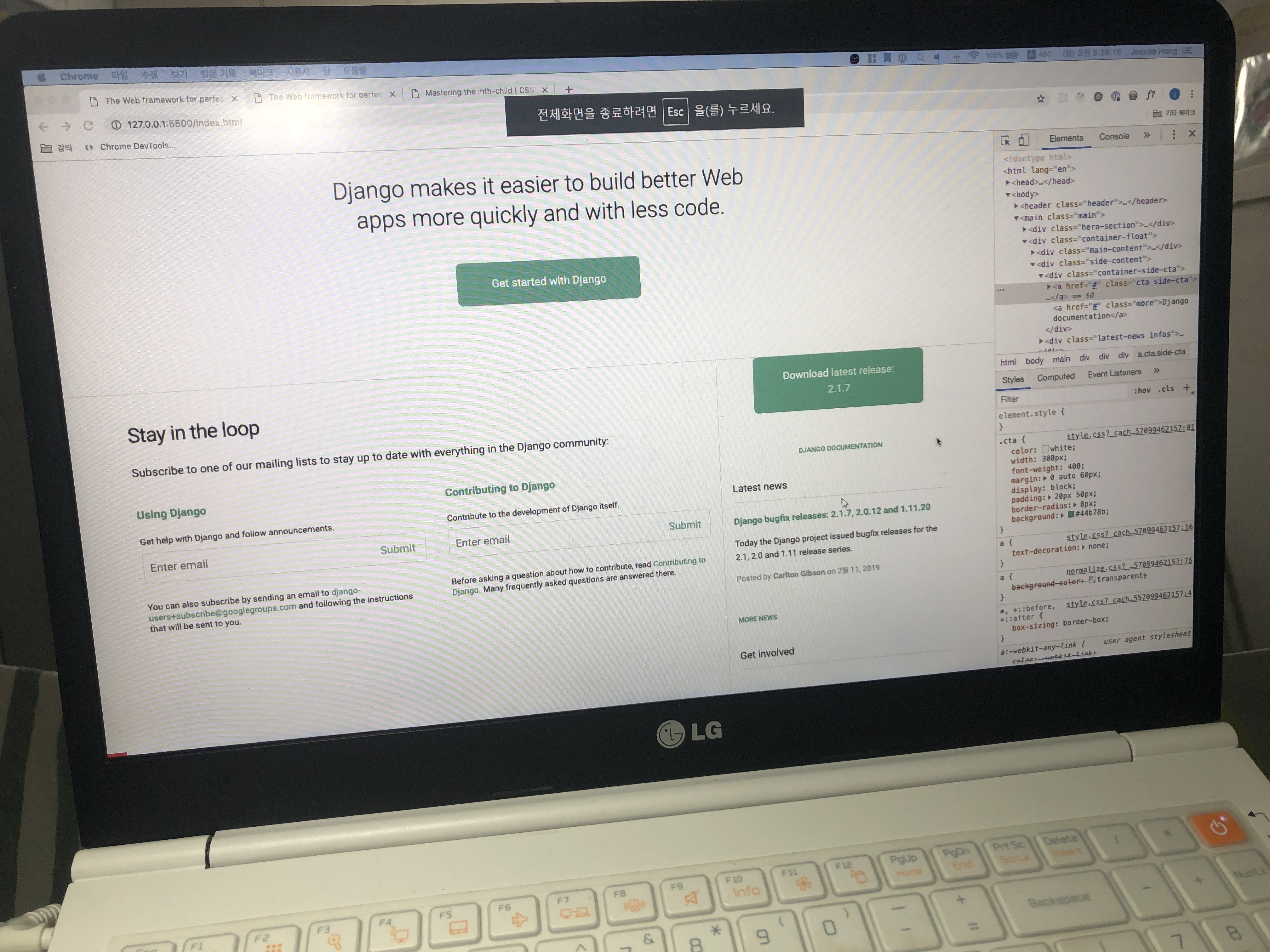
HTML, CSS - main side-content 마크업

마크업 구조!
div.side-content
div.container-side-cta
a.cta side-cta, a.more
div.infos latest-news
h2.infos-title
article.news-article
h3.new-title
a
p.news-desc
p.news-meta
span, time
div.infos get-involved
h2.infos-title
dl.list-community-title
dd.community-desc
dt
dd
a.more
HTML, CSS - main side-content 스타일링
.hero-cta {
width:
margin:
padding:
}
.side-cta {
width: 330px;
padding: 16px 24px;
margin: 40px auto 0;
}
.cta.side-cta:hover {
color: white;
}
.more::after{
content: ' >';
}
.community-title:nth-child(n+2) {
margin-top: 14px;
}
HTML, CSS - Git Github - 버전 관리 소개
프로그래밍은 변경의 연속
- 코드 추가 삭제 지속
- 롤백도 필요
협업의 연속
- 한사람이 작성한 코드를 다른사람이 수정
- 여러사람이 작업한 코드르 합치기도
>> 버전 관리 프로그램 : Git, Github
<!DOCTYPE html>
<html lang="en">
  <head>
    <meta charset="UTF-8" />
    <meta name="viewport" content="width=device-width, initial-scale=1.0" />
    <meta http-equiv="X-UA-Compatible" content="ie=edge" />
    <link rel="stylesheet" href="./normalize.css" />
    <link rel="stylesheet" href="./style.css" />
    <link
      href="https://fonts.googleapis.com/css?family=Roboto:300,400,500,700,900"
      rel="stylesheet"
    />
    <title>The Web framework for perfectionists with deadlines | Django</title>
  </head>
  <body>
    <header class="header">
      <div class="container">
        <h1 class="logo">
          <img
            src="https://static.djangoproject.com/img/logo-django.42234b631760.svg"
            alt="Django"
          />
        </h1>
        <nav class="nav">
          <ul class="list">
            <li class="list-item"><a href="#">Overview</a></li>
            <li class="list-item"><a href="#">Download</a></li>
            <li class="list-item"><a href="#">Documentation</a></li>
            <li class="list-item"><a href="#">News</a></li>
            <li class="list-item"><a href="#">Community</a></li>
            <li class="list-item"><a href="#">Code</a></li>
            <li class="list-item"><a href="#">About</a></li>
            <li class="list-item"><a href="#">♥ Donate</a></li>
          </ul>
        </nav>
      </div>
    </header>
    <main class="main">
      <div class="hero-section">
        <div class="container">
          <p class="intro-desc">
            Django makes it easier to build better Web apps more quickly and
            with less code.
          </p>
          <a href="#" class="hero-cta cta">
            Get started with Django
          </a>
        </div>
      </div>
      <div class="container-float">
        <div class="main-content">
          <h2 class="main-title">Stay in the loop</h2>
          <p class="main-desc">
            Subscribe to one of our mailing lists to stay up to date with
            everything in the Django community:
          </p>
          <div class="mailing-layout">
            <div class="mailing">
              <h3 class="mailing-title">
                <a href="#">
                  Using Django
                </a>
              </h3>
              <p class="mailing-desc">
                Get help with Django and follow announcements.
              </p>
              <form action="#" class="mailing-form">
                <label for="input-following"
                  >send email for following news</label
                >
                <input
                  type="email"
                  placeholder="Enter email"
                  id="input-following"
                  name="input-following"
                />
                <button type="submit" class="mailing-form-btn">Submit</button>
              </form>
              <p class="mailing-desc">
                You can also subscribe by sending an email to
                <a href="mailto:django-users+subscribe@googlegroups.com"
                  >django-users+subscribe@googlegroups.com</a
                >
                and following the instructions that will be sent to you.
              </p>
            </div>
            <div class="mailing">
              <h3 class="mailing-title">
                <a href="#">Contributing to Django</a>
              </h3>
              <p class="mailing-desc">
                Contribute to the development of Django itself.
              </p>
              <form action="#" class="mailing-form">
                <label for="email-contribute"
                  >send e-mail for contribution</label
                >
                <input
                  type="email"
                  placeholder="Enter email"
                  id="email-contribute"
                  name="email-contribute"
                />
                <button type="submit" class="mailing-form-btn">
                  Submit
                </button>
              </form>
              <p class="mailing-desc">
                Before asking a question about how to contribute, read
                <a
                  href="https://docs.djangoproject.com/en/dev/internals/contributing/"
                  >Contributing to Django</a
                >. Many frequently asked questions are answered there.
              </p>
            </div>
          </div>
        </div>
        <div class="side-content">
          <div class="container-side-cta">
            <a href="#" class="cta side-cta"
              >Download <em>latest release: 2.1.7</em></a
            >
            <a href="#" class="more">Django documentation</a>
          </div>
          <div class="latest-news infos">
            <h2 class="infos-title">Latest news</h2>
            <article class="news-article">
              <h3 class="news-title">
                <a href="#"
                  >Django bugfix releases: 2.1.7, 2.0.12 and 1.11.20</a
                >
              </h3>
              <p class="news-desc">
                Today the Django project issued bugfix releases for the 2.1, 2.0
                and 1.11 release series.
              </p>
              <p class="news-meta">
                Posted by <span>Carlton Gibson</span> on
                <time datetime="2019-02-11">2월 11, 2019</time>
              </p>
            </article>
            <a href="#" class="more">More news</a>
          </div>
          <div class="get-involved infos">
            <h2 class="infos-title">Get involved</h2>
            <dl class="list-communities">
              <dt class="community-title">
                <a href="#">#django IRC channel</a>
              </dt>
              <dd class="community-desc">Chat with other Django users</dd>
              <dt class="community-title"><a href="#">Ticket system</a></dt>
              <dd class="community-desc">
                Report bugs and make feature requests
              </dd>
            </dl>
            <a href="#" class="more">Inside the django community</a>
          </div>
        </div>
      </div>
    </main>
    <footer class="footer">푸터</footer>
  </body>
</html>
/* 공통 속성 */
*,
*::before,
*::after {
  box-sizing: border-box;
}
html {
  font-size: 10px;
}
body {
  min-width: 1060px;
  font-size: 1.8rem;
  line-height: 1.6;
  font-family: Roboto, Avenir, sans-serif;
}
a {
  text-decoration: none;
}

/* CALL TO ACTION */
.cta {
  color: white;
  font-weight: 400;
  display: block;
  border-radius: 8px;
  background: #44b78b;
}
.cta:hover {
  background: #51be95;
}

/* HEADER */
.header {
  background: #0c4b33;
  height: 72px;
  padding: 15px 0 4px;
}
.container,
.container-float {
  max-width: 1400px;
  margin: 0 auto;
  padding: 0 20px;
  position: relative;
}
.container-float::after {
  display: block;
  content: "";
  clear: both;
}
.logo {
  margin: 0;
  padding-left: inherit;
  position: absolute;
  top: 0;
  left: 0;
}
.nav {
  text-align: right;
}
.list {
  margin: 0;
  font-size: 0;
}
.list-item {
  font-weight: 700;
  display: inline-block;
  font-size: 1.3rem;
  text-transform: uppercase;
}
.list-item > a {
  color: white;
  display: block;
  padding: 10px;
}
.list-item > a:hover {
  color: #c9f0dd;
}

/* MAIN */
/* HERO SECTION */
.hero-section {
  padding: 50px 0;
  text-align: center;
  border-bottom: 1px solid #cfe3dc;
}
.intro-desc {
  margin: 40px auto 50px;
  width: 700px;
  font-weight: 300;
  font-size: 3.6rem;
  line-height: 1.3;
}
.hero-cta {
  width: 300px;
  margin: 0 auto 60px;
  padding: 20px 50px;
}

/* MAIN CONTENT */
.main-content {
  float: left;
  width: 70%;
  padding-right: 20px;
}
.main-title {
  font-weight: 400;
  margin: 40px 0 20px 0;
  font-size: 3.2rem;
  letter-spacing: -1px;
}
.main-desc {
  margin: 0 0 20px 0;
}
.mailing-layout {
  padding-top: 20px;
}
.mailing-layout::after {
  content: "";
  display: block;
  clear: both;
}
.mailing {
  float: left;
  width: 48%;
}
.mailing:first-child {
  margin-right: 4%;
}
.mailing-title {
  margin: 0 0 20px 0;
  font-size: 1.8rem;
  font-weight: 700;
}
.mailing-title > a,
.mailing-desc > a {
  color: #20aa76;
}
.mailing-title > a:hover,
.mailing-desc > a:hover {
  color: #25c488;
}
.mailing-desc {
  margin: 0;
  font-size: 1.4rem;
  line-height: 1.3;
}
.mailing-form {
  margin: 10px 0 30px;
  position: relative;
}
.mailing-form > label {
  position: absolute;
  width: 1px;
  height: 1px;
  overflow: hidden;
  margin: -1px;
  clip: rect(0, 0, 0, 0);
}
input[type="email"] {
  width: 100%;
  border: 1px solid #cfe3dc;
  border-radius: 4px;
  height: 5rem;
  padding: 6px 80px 8px 10px;
}
.mailing-form-btn {
  position: absolute;
  top: 30%;
  right: 1rem;
  border: 0;
  color: #44b78b;
  background: transparent;
  cursor: pointer;
}
.mailing-form-btn:hover {
  color: #0c4b33;
}

/* SIDE CONTENT */
.side-content {
  float: right;
  width: 30%;
  margin: 0;
  padding: 0 0 30px 20px;
  border-left: 1px solid #cfe3dc;
}
.side-content a:hover {
  color: #25c488;
}
.cta.side-cta:hover {
  color: white;
}
.container-side-cta {
  text-align: center;
}
.side-cta {
  width: 330px;
  padding: 16px 24px;
  margin: 40px auto 0;
}
.side-cta em {
  font-style: normal;
  color: #c9f0dd;
}
.more {
  display: block;
  margin-top: 20px;
  font-size: 1.2rem;
  font-weight: 500;
  text-transform: uppercase;
  color: #20aa76;
}
.more::after {
  content: " >";
}
.infos {
  margin-bottom: 40px;
}
.infos-title {
  font-size: 1.8rem;
  font-weight: 400;
  border-bottom: 1px solid #cfe3dc;
  margin: 3.5rem 0 0 0;
  padding-bottom: 1rem;
}
.news-title {
  margin: 0;
  font-weight: 700;
  font-size: 1.6rem;
}
.news-title > a,
.community-title > a {
  color: #20aa76;
}
.news-article {
  padding: 20px 0;
}
.news-desc {
  font-size: 1.5rem;
}
.news-meta {
  margin: 0;
  margin-top: 1rem;
  font-size: 1.4rem;
  color: #859d94;
}
.news-meta > span {
  font-weight: 700;
}
.list-communities {
  padding: 20px 0;
  margin: 0;
}
.community-title {
  font-size: 1.4rem;
}
.community-title:nth-child(n + 2) {
  margin-top: 14px;
}
.community-desc {
  margin: 10px 0 0 0;
  font-size: 1.4rem;
  color: #859d94;
}

/* FOOTER */
.footer {
  background: green;
  clear: both;
}
패스트캠퍼스 파이썬 인강 자세한 내용은 아래 링크를 참고해 주세요!
'Web,FrontEnd' 카테고리의 다른 글
| [패스트캠퍼스 수강 후기] 파이썬 인강 자기계발 챌린지 26 회차 미션 (0) | 2020.06.19 |
|---|---|
| [패스트캠퍼스 수강 후기] 파이썬 인강 자기계발 챌린지 24 회차 미션 (0) | 2020.06.17 |
| [패스트캠퍼스 수강 후기] 파이썬 인강 자기계발 챌린지 22 회차 미션 (0) | 2020.06.15 |
| [패스트캠퍼스 수강 후기] 파이썬 인강 자기계발 챌린지 21 회차 미션 (0) | 2020.06.14 |
| [패스트캠퍼스 수강 후기] 파이썬 인강 자기계발 챌린지 20 회차 미션 (0) | 2020.06.13 |


